Introduction
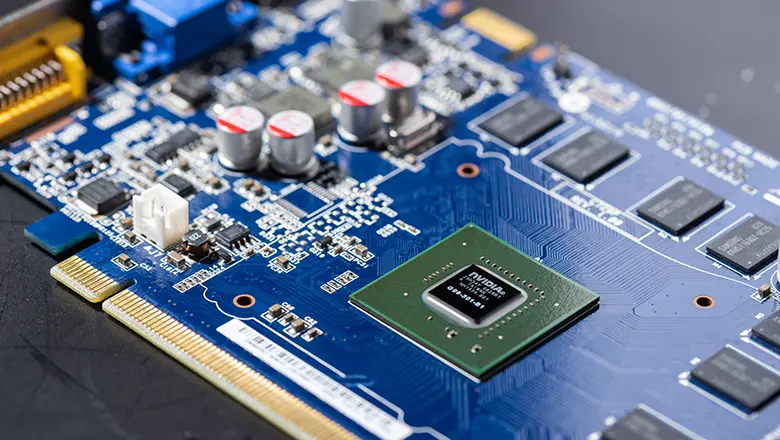
Every modern graphics card relies on a special designed GPU circuit board (PCB), it is crucial for ensuring high performance, stable operation, and long-term durability. Many people focus only on the computing power of the GPU chip, rarely noticing that the graphics card PCB is the true core framework. It connects all critical components such as the GPU core, video memory, power management unit (VRM), and power connectors, integrating these disparate components into a complete and reliable graphics processing system.
But what is a GPU PCB? It’s much more than just a platform to mount chips. The graphics card PCB not only deal with high-speed data transmission but also provides a stable and reliable power supply for the entire system and enables normal communication between the GPU and the motherboard via the PCIe interface. At the same time, the PCB also address thermal management and EMI (electromagnetic interference) protection to ensure good signal integrity even under high-frequency GPU operation.
From games to compute workloads, GPUs have a lot of heat, so a PCB capable of effective heat dissipation is needed. The design impact of the PCB is very important: get it wrong, and even the best GPU chip cannot perform to its full potential. Let’s discuss deeply into how good PCB design enables next-generation graphics card performance and reliability.
What is a GPU PCB and Why is it Important?
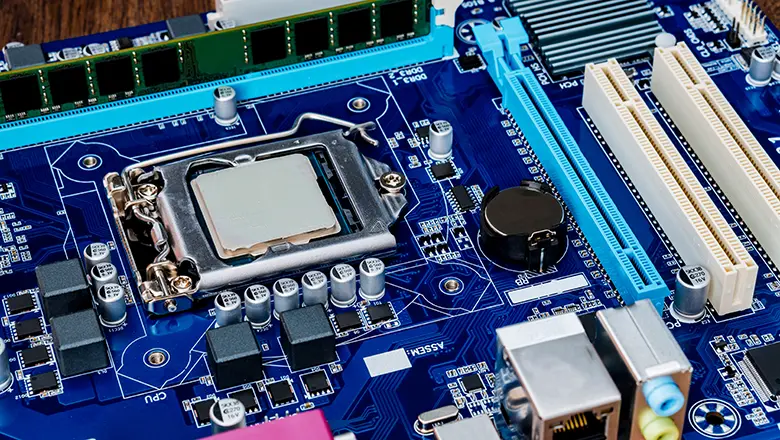
A GPU PCB (Graphics Processing Unit Printed Circuit Board) is the core part of the graphics card. Inside the board, the PCB plays several important roles:
- It connects the GPU chip and power circuitry to surrounding components such asVRAM, power connectors and voltage regulator modules,.
- It can ensurethe transfer between the GPU and memory, as the PCIe interface to the motherboard, and also is fast and reliable.
- It needs to dissipate the large amount of heat generated by high-power components.
- PCBs need to maintain signal integrity at high frequencies to ensure the reliability of graphics processing and computing tasks.
The design and manufacturing of a graphics card PCB must meet three main requirements: first, it must be able to stably carry hundreds of watts of power transmission, ensuring efficient power supply; second, it must support high-speed interconnection, ensuring smooth data transmission between components; and third, as the physical foundation of the entire graphics card, it must firmly fix all key electronic components, laying a solid foundation for the stable operation of the graphics card.
Core Functions & Features of a GPU PCB

1. Power Delivery
The PCB must route power from both the PCIe interface and dedicated power connectors to the GPU chip and memory modules, use thick copper and robust voltage regulator modules. These VRMs convert input voltages can fit the needs of the GPU and memory, to ensure stable power.
2. Thermal Management and Heat Dissipation
GPUs generate a large amount of heat during working time, some models even consuming more power. Printed circuit boards (PCBs) are designed under this to prevent component be damaged and then ensure stable performance.
3. Signal Routing and High-Speed Interconnects
The high-speed data transmission between the GPU chip, memory, and PCIe interface, and with correct PCB stacking, impedance control, and trace, are essential for maintaining signal integrity at high frequencies; these are the main values of this data flow.
4. EMI Shielding and Ground Planes
When the high-speed signals are transmitted on a GPU PCB, ground and proper routing not only can reduce electromagnetic interference (EMI), but also shield sensitive lines, then ensure the graphics processing is not affected.
5. Mechanical Support and Reliability
High quality PCB need to withstand mechanical stress, component weight, and temperature cycling. Thicker PCBs can improve power supply integrity and rigidity, providing stable physical support for graphics cards.
Key Features Table
| Function | PCB Feature | Design Impact |
| Power Delivery | Voltage regulator modules, thick copper, short traces | Ensures the stable power, it is important for overclocking and reliability |
| Signal Integrity | Matched trace length, proper impedance, dedicated layers | Keep high-speed data transfer and minimizes data corruption |
| EMI Shielding | Ground planes, strategic component placement, shielded paths | It can help reduce electromagnetic interference, supporting clean signals |
| Heat Dissipation | Thermal pads, vias, heatsink/pipe mounts, board layout | Allows sustained performance, prolongs card lifespan |
| Mechanical Strength | Increased thickness, stiffening layers, reinforced mount points | Prevents PCB flexible and breakage over device life |
GPU PCB Layer Structure & Design Considerations
High-performance GPU PCBs typically feature between 6 and 12 layers, each serving a vital function.
Layer Breakdown
- Signal layers: Carryfor high-speed data transmission between the GPU and memory, GPU and PCIe, etc, this is the main aspects of the graphic card’s channel.
- Ground planes: Improve signal quality, reduce electromagnetic interference(EMI), and provide a stable path.
- Power planes: Managepower supply, accurately delivering stable power from the interface and VRM to the GPU core&memory.
- Internal routing layers: Enablecomplex,high-density wiring layout under an acceptable space, support high-power, highly integrated graphics cards.
- Thermal vias: Dedicated channels, mostlyfilled with copper, facilitate heat dissipation by connecting hot areas to larger planes.
Design Considerations
A good GPU PCB design must:
- Reasonablestack layers designs, to devide high-speed signals into noisy power delivery circuits.
- Use thicker PCBs or stiffeners to improve power integrity and rigidity (reduc flex, preventing break).
- Adjustimpedance tuning to keep signal integrity completely.
- Route traces evenly around the GPU and memory to reduce thedeviation.
- Use thermal pads and heatsinks in thermal hot areato Enhanced heat dissipation.
- Reservedfor futureproofing (e.g., support new PCIe standards or 600W+ power delivery).
PCB Materials, Thermal, and Power Integrity
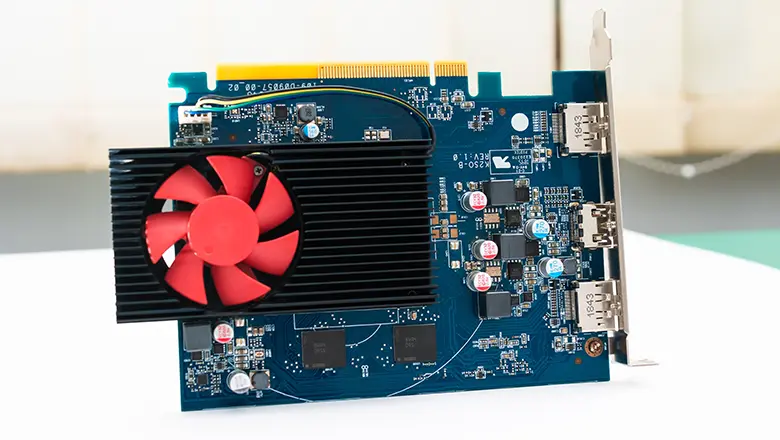
The most important acpects that affecting the reliability of the PCB and the performance of the graphics card are the differences in materials and producing processes.
Materials
- FR4 (fiberglass epoxy): Common materials. competitive, provide solid thermal performance and electrical insulation.
- HDI (High Density Interconnect): Used for compact, high-performance cards for space, signal fidelity, and routing density are at a premium.
- Copper weight and purity: The thicker copper (e.g., 2oz/ft²) the more power delivery and heat dissipation.
Thermal Management Strategies
- Thermal pads and viasefficiently transfer heat from the GPU chip and VRMs into larger copper planes or directly into the heatsink.
- The layout of thermal interfacesand the selection of cooling systems (air, heatpipes, or liquid cooling) all help the PCB efficiently manage the lot of heat generated.
Power & Signal Integrity
- Impedance control: through precise control of trace width, spacing, and copper thickness,ensures stable transmission of high-speed signals in high-frequency environments.
- Ground planes: not only reduces EMI and crosstalk but also provides a stable return path for signals.
- Thicker PCBs: are designed for high-power or compute-intensive GPUs.
Reference vs. Non-Reference GPU PCBs
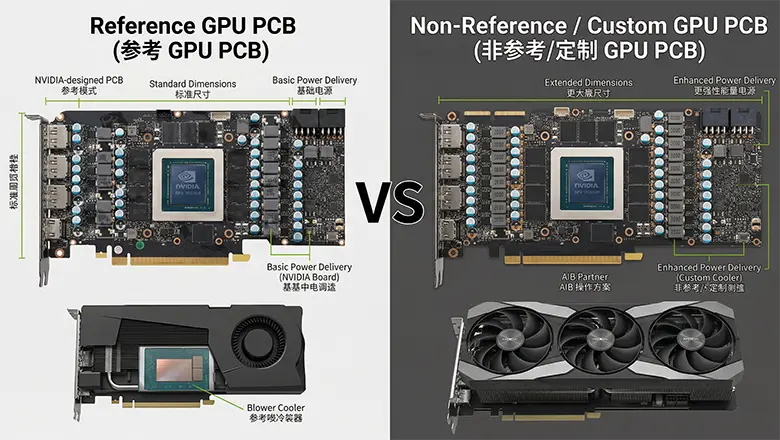
Reference Designs
Reference GPU PCBs, such as NVIDIA Founder’s Edition or AMD’s baseline PCBs, it can focus on wide compatibility and balanced power/thermal design. They use solid but often conservative VRMs, basic cooling, and mid-range PCB stackups.
Non-Reference/Custom Designs
Custom PCBs from partners like (ASUS, MSI, EVGA, etc.) are upgraded by increasing the number of layers, optimizing power supply stability, and enhancing thermal management, these PCBs feature high-quality VRMs, additional thermal pads, custom heatsinks, and a more robust structure, and can even support extreme overclocking requirements.
Which Should You Choose?
- Reference GPU PCBs are best for general gaming, office, and scenarios where compatibility with standard air and water cooling solutions is important. They’re tested for baseline stability, reliability, and act as a demonstration of how a graphics card works right out of the box.
- Custom/Non-Reference GPU PCBs offer important advantages: enhanced power supply stability (crucial for overclocking), more advanced thermal management for high-heat-generating GPUs, power supply integrity and structural rigidity through thicker circuit boards. They are specifically designed for enthusias, creators, and professional computing users seeking the ultimat GPU performance.
How GPU PCBs Are Made and PCB Production
From Schematic to Circuit Board
- PCB production for graphics cards starts with precise electronic schematics, carefully laying out critical traces for the GPU chip and power circuitry. The aim? To ensure high-speed signal transmission and minimize impedance mismatches.
- State-of-the-art fabrication creates multi-layer PCBs—often 6 and 12 layers—for high performance GPUs. This multi-layered structure allows for dense routing around the GPU and memory modules, dedicated power planes, and well-separated signal layers.
Soldering, Assembly, and Testing
- Automated pick-and-place machines mount graphics processing unit, VRAM, voltage regulator modules, and dozens of small surface components onto the printed circuit board.
- Reflow soldering then secures all components. Proper solder joint quality is the most important thing—even the smallest defect can interrupt power supply seriously.
- Rigorous automated and manual inspections check onsolder bridges, bad joints, or faulty interconnects, to ensure everything is 100% perfect.
- Through Burn-intests we can ensure boards signal integrity at high clock speeds and dissipate heat efficiently with their intended cooling system.
PCB Must Meet Tough Standards
Efficient PCB producing and soldering steps are crucial to ensuring the reliability of each graphics card PCB. Through the loads of computing and professional applications, the PCB must be able to effectively dissipate heat, maintain stable impedance, and provide sufficient mechanical strength.
Common GPU PCB Issues, Reliability, and Maintenance
Common Problems
- Heat Damage: High-performance GPUs have a lot of heat. Insufficient thermal management or failed thermal pads will lower the PCB’s reliability and maybe warp the board or cause solder failures, this is a disaster.
- Power Delivery Failures: Bad or aging voltage regulator modules can result in unstable power—usually can be seen as graphics glitches, crashes, or reboots under load.
- Signal Integrity Issues: If Impedance not match, poor ground plane layout, or bad solder joints they can affect electromagnetic interference, causing data errors between the GPU chip, memory modules, and PCIe interface.
- Component Failure: Capacitors, inductors, or VRMs maybe fail—usually can be seen as bulging, discoloration, or even burn marks on the PCB.
Essential Maintenance
- Regular Cleaning: Dust around the GPU and on the PCB can cause heat buildup, leading to increased operating temperatures and potentially short circuits. Regular cleaning with compressed air is recommended to keep the PCB clean.
- Thermal Paste and Pads: Replace thermal interface materials promptly after disassembling the graphics card. Aged or dried-out thermal pads or paste will significantly reduce PCB cooling efficiency.
- Mechanical Support: For large GPUs, we will use a support bracket to prevent sag or flexing, won’t stresses solder joints and PCB layers.
- Proactive Monitoring: Tools like HWInfo or GPU-Z can let you monitor VRM temperatures and spot potential issues before failure.
Maintenance Checklist Table
| Task | Frequency | Notes |
| Dust cleaning | Quarterly | More often in dusty/urban areas |
| Inspect pads/paste | Annually/As needed | After heavy use, overheating, or card teardown |
| Monitor temps | Always On | Look for rising VRM or GPU readings |
| Check connectors | Each install | Ensure PCIe slot, auxiliary power are snug, no burn marks |
| Visual check | Each build | Look for bulged, leaking, or burnt components |
GPU PCB vs. Full Graphics Card
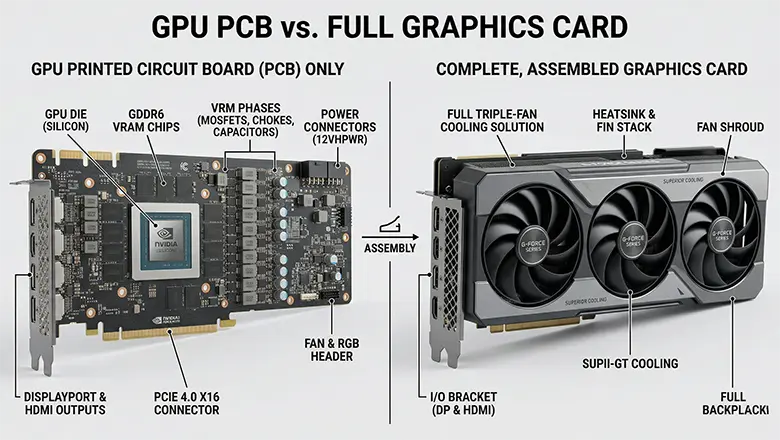
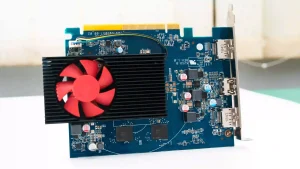
A graphics card is a complete product; besides the PCB, it includes a cooling system (fans, heatsinks, etc., some using water cooling), a backplate, a casing, and output interfaces such as HDMI/DP. Its main function is to connect the GPU chip, video memory, and voltage regulator module (VRM), while ensuring a stable transmission of power and signals.
Difference Table
| Feature | GPU PCB (Printed Circuit Board) | Full Graphics Card |
| Function | Core electrical backbone | Complete solution: PCB + cooling + housing + IO |
| Contains | GPU, VRAM, VRMs, soldered components | PCB + fans, heatsink, casing, backplate, display IO |
| User Interaction | Rare (only advanced users, modders) | Everyday install, upgrade, and visible maintenance |
| Performance Impact | Direct (signal, power, thermal, EMI) | Dependent on all parts working in harmony |
Real-World Examples & Design Impact
- NVIDIA RTX 4090 Custom PCBs: Utilizes a 12-layer PCB, high-capacity VRM phase, reinforced mounting poins, and thickened copper layers, designed to withstand power exceeding 450 watts, maintaining stable signal integrity at high frequencies.
- AMD Radeon RX 580 Mining Editions: Features an exceptionally durable PCB made with high-quality FR4 material, coupled with stable grounding and additional EMI protection, ensuring reliable performance for months of continuous computing operation.
- MSI Gaming X Trio: Features custom thermal vias beneath the GPU and VRM, a 6-layer PCB for improved heat dissipation efficiency, and precisely adjusted signal path impedance to ensure stable performance during high-frequency GPU operation.
FAQs
How does PCB design impact GPU performance?
Good PCB design allows the GPU to draw stable power, maintain signal integrity at high data rates, and dissipate heat effectively. This enables maximum clock speed and reliability.
What causes EMI in GPU PCBs, and how do designers combat it?
Electromagnetic interference is mainly caused by high-speed switching and high-density circuitry. Designers use ground planes, careful component placement, and shielded traces to reduce EMI.
Why must a GPU PCB be able to dissipate a lot of heat?
High-speed GPUs and voltage regulation modules generate a significant amount of heat. If heat dissipation is not adequate, it can damage components and impair their function. Therefore, we must dissipate this heat using thermal pads, copper layers, and heatsinks to achieve protection.
What’s the benefit of thicker PCBs?
Thicker PCBs improve power integrity, reduce bent and also can support more current—it is more important for AI, and high-end gaming.
Glossary of Key Terms
- GPU PCB: The main brain inside a graphics card.
- Thermal Pads: A materials which we will placd between chips and heatsinks to conduct hea
- Voltage Regulator Modules (VRMs): Circuits regulating supplied power.
- Signal Integrity: The fidelity of data signals, critical for high-speed compute.
- Impedance: Resistance to electrical flow, must be carefully tuned for high-speed circuits.
- Ground Planes: PCB layers who will be used to minimize noise and EMI.
- Power Delivery: The mechanism of getting stable power to the GPU and memory.
- Solder: Put tin on the electrical components to the printed circuit.
Conclusion
The GPU PCB is the core of our graphic card, transforming a raw GPU chip into a powerful graphics and compute. Through our PCB design, scientific heat dissipation and power supply configuration, effective EMI control, and high-quality materials, the PCB can unleash GPU performance and ensure its’ stable.
If we used for gaming or professional computing, the design and quality of the PCB are same important as the GPU chip itself. Regular PCB cleaning, component maintenance, and the selection of high-quality products are essential for long-term stable operation of the graphics card, maximizing the value of your hardware investment.