
Motherboard vs Circuit Board: Understanding the Differences

When you open any modern electronic device—whether it’s a high-performance gaming PC, a slim laptop, a tv, or even a washing machine—you’ll see circuit boards everywhere in our daily life. As the base of all electronic products, these boards act as the main point for nearly every function, from data process to control LED indicators.
However, not all circuit boards are same. The motherboard, a special kind of pcb often referred to a PCB motherboard, it holds an irreplaceable importantl role in computers and other high precision equipment. Even though motherboards are technically boards, the differences between them is quite important when you check their design, functionality, and real purpose.
To understand the difference between these key components isn’t theoretical; it has real-world value. It can also help us save time, cut costs, and avoid unnecessary hassle—no matter you’re building a custom PC, diagnosing hardware problems, or developing new products as per your expertise in the PCB industry.
Key Points:
- Motherboard is a computer’s main circuit board: It not only connects, but also coordinates all essential electronic components.
- Circuit boards come in many forms: From simple PCB control panels to complex, multi layere motherboards in high-end laptops.
- PCBs (Printed Circuit Boards): The broader category for all board-level circuit carriers—with a motherboard, GPU, sound card, tiny sensor module.
What Is a Circuit Board? PCB and Motherboard Basics
The main function of any circuit board (commonly called a PCB) is to provide mechanical support and electrical pathways for the components like the CPU, resistors, capacitors, diodes, sensors, and more. Circuit boards are essential in everything from calculato to cars..
What is a PCB?
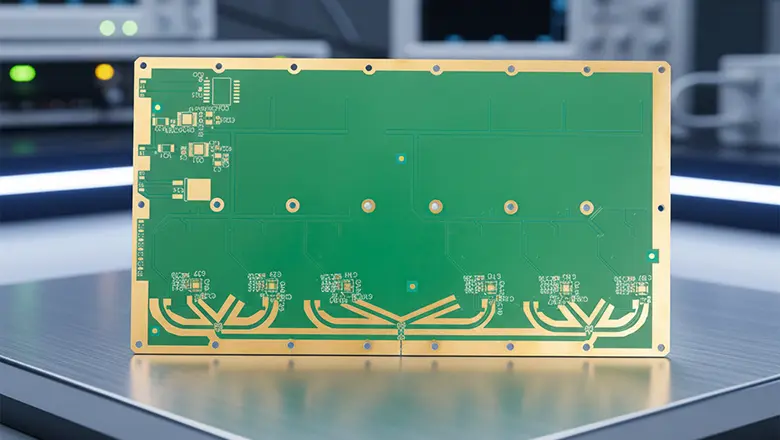
- PCB stands for Printed Circuit Board.Whenever we refer to the thin board made of an insulating material (usually FR4) etched with copper.
- A PCB is a circuit board—but not all circuit boards serve the same function. The simplest example is a basic control board inside a home appliance; the most complex might be the multi-layer backbone of a spacecraft navigation system or a motherboard is a printed circuit board in a computer
How Circuit Boards Are Made
- Substrate Layering: Fiberglass, Teflon, or other materials for rigidity and insulation.
- Copper Etching: Creating intricate traces for current flow.
- Solder Mask and Silkscreen: For protection and easy identification of each component..
- Component Assembly: Placement of chips, resistors, capacitors, and connectors—be it just a few in a simple PCB, or hundreds in a motherboard PCB.
Applications
- A main circuit board may control an entire washing machine or TV.
- A smaller circuit board might simply power LEDs, manage a battery, or drive a sensor.
Motherboard PCB: Why the Motherboard is a Specialized Type of PCB

Motherboard PCB we usually referred to as the “backbone” of our computer. It’s a specialized type of PCB, it is designed for much complexity, reliability, and flexibility.
What makes a motherboard so unique among circuit boards?
- Motherboard design includes high copper layers (usually 6–12) for power delivery, ground, and high-speed signals.
- Complex than a regular circuit: The motherboard involved key components like the CPU, RAM, BIOS/UEFI, graphics cards, SATA or NVMe storage, network, USB, and more
- Expandable: Motherboard hosts slots and sockets, making the user-upgradable—a feature which never found its simpler, regular circuit boards.
Is a Motherboard a PCB?
Yes! If you’re ever asked “Is motherboard a PCB?” the answer is always yes. A motherboard PCB—just a highly advanced, assembled PCB that serves as the main circuit in a computer system.
Key Differences Explained: PCB vs Motherboard
What’s the difference between motherboard vs circuit board, or PCB vs motherboard? Here are the key differences for reference:
| Category | Motherboard (Printed Circuit Board) | Regular Circuit Board / Standard PCB |
| Functionality | Main circuit board: handles, connects all major components | Often task-specific: e.g., control, lighting |
| Complexity | Multilayer, high-density, advanced power/signal routing | Simpler, 1–2 layers, basic traces |
| Upgradability | Yes (slots, headers, modular design) | Rare (fixed components, usually not upgradable) |
| Components Supported | CPU, RAM, GPU, storage, I/O, power, sensors | Usually limited to microcontroller, sensors, basic ICs |
| User Accessibility | Designed for easy upgrades and diagnostics | Minimal accessibility, rarely serviceable |
| Manufacturing Cost | High (due to complexity, advanced PCB design) | Low to moderate |
Motherboard Design vs Regular Circuit Board Design
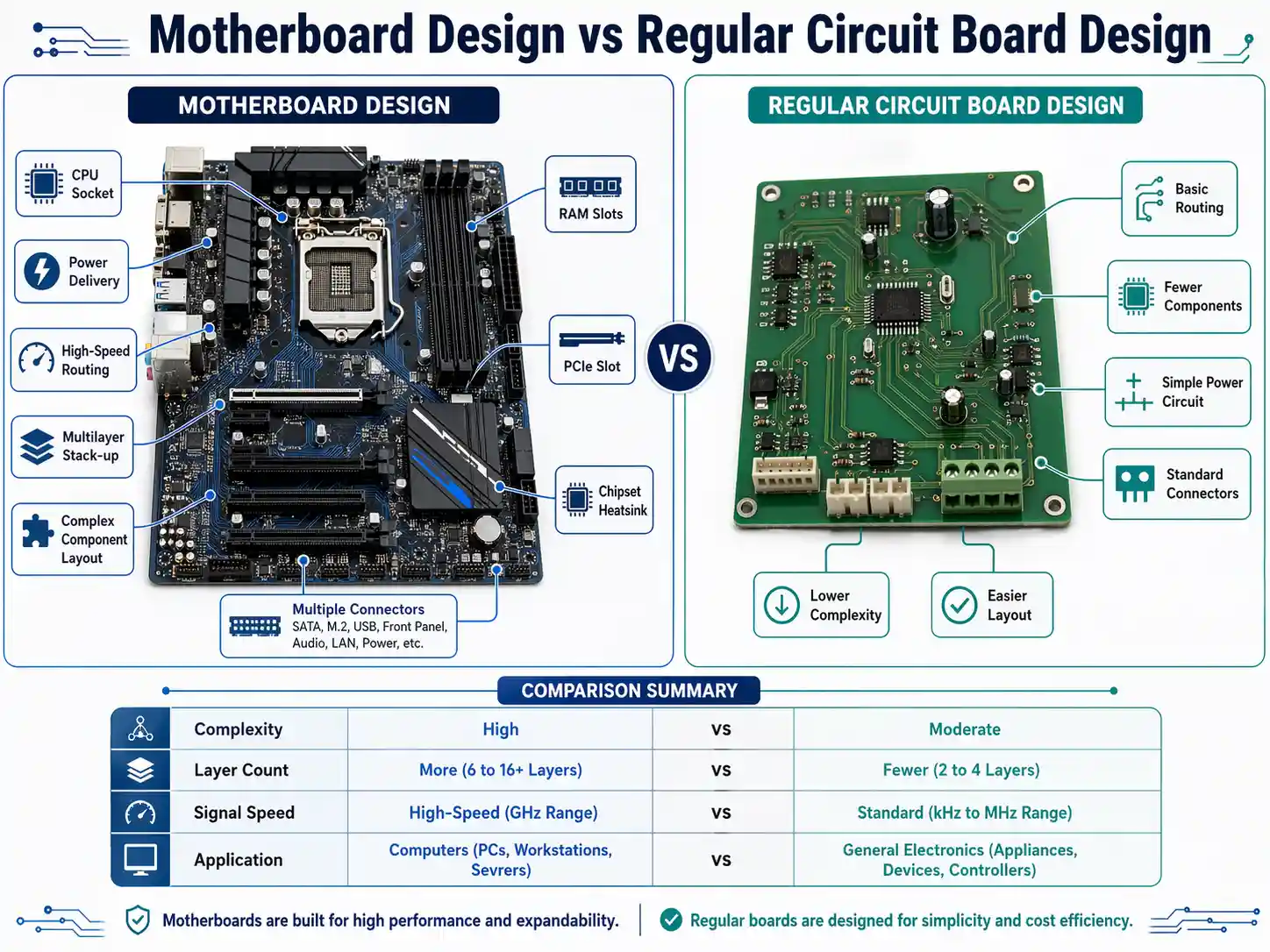
Design differences between motherboards and circuit boards define their capabilities, repairability, and applications.
Motherboard Design
- Multilayer PCB: At least 4–8 layers, ensur power isolation, signal integrity, and support for high-speed communication buses.
- Dense Trace Layouts: For high bandwidth connections between RAM, CPU, and graphics.
- Component Variety: Supports sockets, slots, and connectors for our every modern device .
- Thermal Design: Larger boards with provisions for current-carrying traces, VRM heat sinks, and airflow control.
- Diagnostics: LEDs, test headers, debugging interfaces for easy failure detection.
Regular Circuit Board (Standard PCB) Design
- Single or Double Layer: Simple copper routing, basic solder mask.
- Minimal Components: Often just a power IC, a relay, or a sensor.
- Fixed Functionality: No expansion, rarely intended for user interaction.
- Lower Cost Materials: Less copper, basic connectors.
Design Differences Table:
| Feature | Motherboard PCB (System Board) | Regular Circuit Board / PCB |
| Layer Count | 4–12+ | 1–2 |
| Upgradeable | Yes | No |
| EMI/RF Shielding | Integral to design | Minimal |
| Application | Central system management | Dedicated, small-scale tasks |
Components Like the CPU: How Motherboards and Circuit Boards Handle Electronic Components
A major aspect in the difference between motherboard vs circuit board lies in the type and number of electronic components supported, their role, and how these are physically and logically integrated.
On a Motherboard (PCB Motherboard)
Motherboard design is centered around supporting, interconnecting, and powering a wide range of components like:
- CPU (Processor): The brain of computer—a motherboard is a exact type of PCB capable of providing the complex power, signals, and coordinates needed by modern CPUs
- RAM (System Memory): Motherboard PCB includes multiple RAM slots (DIMMs), supporting future updates.
- GPU/PCIe Slots: For graphics cards, sound cards, SSD add-ons, etc.—a hallmark of a motherboards.
- Chipset: Directs data between CPU, RAM, storage, and peripherals.
- BIOS/UEFI Firmware: Embedded, which allow booting, setup, and advanced diagnostics.
- Power Management: High-capacity traces and VRMs for stable operation.
- Input/Output Headers: USB, Ethernet, audio, fan, RGB, and more—making the motherboard the backbone for all user devices.
- Storage Connectors: SATA, M.2, NVMe, etc.
- Sensors/Diagnostics: Temperature, voltage readouts, POST code displays for troubleshooting.
- Specialized Circuit Board Elements: Sometimes the audio, network, or the wireless/Bluetooth PCB modules integrated a attached as daughter boards.
This extensive component support is what makes the motherboard a specialized, high-value form of PCB—a complex than a regular circuit, designed for expansion, repair, and long-term use.
On a Regular Circuit Board
A regular circuit board or simple PCB it is designed for limition, usually fixed-function tasks, such as:
- Microcontroller or a Single IC: Like the brains of a garage door opener.
- LED Drivers: Power and control for lighting.
- Capacitors, Resistors, Sensors: Filtering, timing, and feedback for basic controls.
- Relays, Switches, Small Connectors: Managing power to simple devices or interfaces.
- Sometimes smaller circuit or signal paths: For things like analog sensors, basic LCD displays, and user input (buttons).
These PCBs are very important but designed for one or a few tasks rather than system coordination.
Types of Circuit Boards: From Simple PCB to Specialized Circuit Board
Circuit boards are essential to electronics, but vary widely in form and function:
Types of Circuit Boards
Simple PCB:
- Single-sided circuit board, used in basic toys, remotes, clocks.
- Lower cost, simpler design, easy to replace.
Double-Layer PCB (Regular PCB):
- Used in appliances, LED lights, audio amplifiers.
- Slightly more complex but still focused on dedicated tasks.
Multilayer PCB (Complex than a Regular Circuit):
- Found in smartphones, network devices, advanced sensors.
- High-density, supports higher speeds and more features.
Specialized Circuit Board:
- Custom-designed for control systems, medical devices, automotive ECUs.
- Can be extremely robust, sometimes with specialized coatings.
Motherboard Circuit Board / PCB Motherboard / Main Circuit Board:
- Central, system-oriented, modular, and upgradable.
- Used in PCs, servers, workstations, some industrial control systems.
Assembled PCB:
- Any PCB, it has had electronic components soldered by tin—no matter it’s a motherboard or a simpler board.
PCB and Motherboard Manufacturing: Industry Experience and Innovation
Having extensive experience in the PCB field is a key to producing reliable, cost-efficient, and high-performance boards.
PCB Manufacturing Steps
PCB Design:
- Schematics, layout, and simulation—this stage is especially demanding for motherboard design, which includes considerations for high-speed data, power delivery, EMI, and mechanical stresses.
Layer Stacking and Etching:
- Precise copper patterning, alignment, and lamination for multilayer boards.
Drilling and Plating:
- Creation of vias, through-holes, and pads—importantfor connecting components like the CPU to the other of the board.
Component Placement (Assembly):
- Pick-and-placefile position components like resistors, capacitors, ICs, and connectors.
- Soldering—often with reflow or wave solder, especially for assembled PCB units like motherboards.
Inspection and Quality Assurance:
- Visual, electrical, and automated X-ray inspection.
- Functional testing—especially vital for PCB and motherboard products.
- For motherboard vs circuit board, the volume of tests is much greater and stricter for the motherboard PCB.
Innovations
- Impedance Controlled Traces, Matched Length Routing: For stability in high-frequency applications (PCIe, DDR RAM, USB).
- Heat Pipe, Advanced VRMs on Motherboard: For handling high TDP CPUs and cutting-edge GPUs.
- Environmental Resistance: Specialized circuit board coatings for automotive or outdoor applications.
Standard Circuit Board vs Motherboard: Design Differences and Use Cases
Standard Circuit Board
- Used in: Appliances, some toys and
- Typical roles: Conversion, sensor interfacing, also basic logic.
- Design simplicity: Geared for mass production and quick replace.
Motherboard (Main Circuit Board)
- Used in: All computers, servers, and many advanced electronics.
- Roles: Integrates all computer, memory, networking, storage, user’s
- Design differences: Deliver stability, longevity, user flexibility, upgrade options, and maintain compatibility with generations of devices.
Comparison Table
| Feature/Aspect | Motherboard (PCB Motherboard) | Standard Circuit Board (Regular PCB) |
| Purpose | Central hub; upgradable, flexible | Task-specific; fixed, simple |
| Components Supported | Key components like the CPU, RAM, GPU | Microcontrollers, LEDs, switches |
| User Interaction | High (expansion, diagnostics) | Low/None |
| Complexity | Very high (6–12+ layers typical) | Low to moderate (1–2 layers) |
| Cost | High | Low to moderate |
| Repairability | Difficult, requires expertise | Easier, often swapped |
Motherboard Is Essential: When to Use Each Board Type
- Use a motherboard PCB (main board) if we need a platform capable of expanding, upgrading, and integrating all the computing needs.
- Choose a standard PCB or regular circuit board for applications,it will need cost efficiency, reliability, but no user expansion—such as a lamp, temperature controller, or dedicated factory sensor.
Knowing the difference between PCB and motherboard, to understand the intended role, it can helps you pick the right solution every time.
Motherboard is important in any system where future proofing, complex computing tasks, or multiple user interfaces is needed.
Troubleshooting: Board vs Circuit (Common Issues and Solutions)

Motherboard Troubleshooting
- POST Failures: Check key components like the CPU, RAM, and graphics—try minimal boot configurations.
- No Power: Test power supply, check some burnt components or broken traces on the motherboard .
- Random Resets/Crashes: Look for signs of overheating, bulging capacitors, and check BIOS/UEFI firmware.
- Peripheral Issues: Reseat expansion cards and memory; clean contacts with is opropyl alcohol.
Circuit Board (Regular PCB) Troubleshooting
- No Response: Check the broken solder joints, burnt-out resistors, or failed chip
- Erratic Operation: Inspect the loose connectors, cracked traces, some damaged sensors.
- Replace vs Repair: For complex than a regular circuit (like a motherboard), repairs are difficult; regular circuit boards are often replaced outright to minimize downtime.
FAQs: Printed Circuit Board vs Motherboard
Is a motherboard a PCB?
Yes: a motherboard is a special type of one PCB, it was designed in order to serve as the main circuit board in the computer, it also integrating all components.
What’s the difference between PCB and motherboard?
Motherboards are circuit boards it is designed for expansion, high complexity, and coordination of multiple subsystems; most circuit boards are simpler and more limit.
Motherboard vs circuit board—which is more important?
In a computer, the motherboard is important—it’s the brain of the whole system. In small devices, the primary PCB (circuit board) is necessary to that device’s function.
Are motherboards and circuit boards the same thing?
All motherboards are circuit boards, but not all circuit boards are motherboards. The difference is its complexity, role, and expand ability.
How does PCB design affect system stability and performance?
PCB and motherboard design is vital. Especially for a motherboard, in order to ensure the right trace widths, signal integrity, ground planes, and effective power routing means the difference between system reliability and constant failures. With complex a regular circuit requirements, high-speed data traces (for PCIe, RAM, USB, etc.) need be matched in length and impedance controlled, making motherboard design a high-precision undertaking.
What is an assembled PCB?
An assembled PCB is printed circuit board it has had own components such as ICs, resistors, capacitors, connectors, etc., soldered (either by hand or by machines). All our motherboards need assembled PCBs,it is standard circuit boards in finished electronics.
If all motherboards are circuit boards, are all circuit boards motherboards?
No. Every motherboard is a circuit board—and specifically a type—a vast majority of circuit boards are simple, intended only for single-purpose control, display, or sensing, not for central system coordinate.
How do I know if a board is the main circuit board in a device?
The main circuit board is the largest board,we usually called it motherboard, main board, logic board, or system board. It mainly cause the main processor/controllers, memory, and all major input/output connectors.
Why are circuit boards essential to modern electronics?
Circuit boards provide mechanical structure and precise signal routing for all electronic components. Without PCBs, it would be impossible to packing the functionality into compact devices—or to repair and upgrade efficiently.
Conclusion: Knowing the Difference and Making Smart Choices
To understand the difference between motherboard vs circuit board is more than a technical curiosity—it’s base to smart electronics decision-making. No matter you are planning a new PC build, ot troubleshoot an appliance, designing a device, or simply curious about how ith works, knowing the difference helps make you a better buyer, builder, or engineer.
Let’s review the main points:
- Motherboards are circuit boards, but not all circuit boards are motherboards: Every motherboard is a (PCB),it can serves as the backbone of a computer, and designed for integration and futureproofing. Most other boards (regular PCB) are specialized for a single, limited purpose without provisions for upgrades.
- Key differences explained: Motherboard is a special, multi layer, complex, expandable board,it is essential in computers; regular circuit boards which is simpler, cheaper, and focused on a single task.
- Design differences: A motherboard PCB need higher component density, user expand ability, the advanced diagnostics, and robust construction. Simpler circuit boards focus on not only cost, space, but also the specific function.
- PCB and motherboard: Both sides have overlaps but important differences—PCB is called for all “printed circuit boards,” while “motherboard” refers to the main circuit board in a complex device.
- Industry experience matters: Extensive experience in the PCB field always leads to designs more reliable, efficient, and ready for changing technology.
No matter a motherboard PCB or a regular board, our goal is always robust, reliable, and efficient —the right board serves the main circuit and keeps our devices running as intended.
Actionable Advice:
- For upgraders/builders: Always match your CPU, RAM, and cards to motherboard specs and form aspects. Don’t only see the importance of quality PCB design for system stability.
- For DIY tinkerers: Let’s learn the traces and components on motherboard circuit boards and regular PCBs—we can practice to repair and upgrade with cheaper, simpler boards first.
- For buyers: Research product reliability, reviews, and support before to choose a motherboard. Your main circuit board investment influences your system’s longevity!